Workers are injured every year during equipment maintenance—not because machines fail, but because protection systems fail. One of the most preventable causes? Missing or poorly managed lockout tagout (LOTO) documentation. At the heart of any effective energy control program is the lockout tagout log form: the unglamorous but non-negotiable paper trail that confirms machines are safely de-energized, locked, and tagged before any service begins.
This isn’t just about ticking a box. A properly used LOTO log form protects technicians, satisfies OSHA requirements, and creates a culture of accountability. Yet in too many facilities, the log is treated as an afterthought—filled out late, inaccurately, or not at all. Let’s fix that.
Why the Lockout Tagout Log Form Matters
The lockout tagout log form is the legal and operational record of every energy isolation event. It answers critical questions: Who locked the equipment? When? Which energy sources were controlled? Who authorized the work? Without this documentation, a facility cannot prove due diligence in the event of an incident.
OSHA standard 29 CFR 1910.147 requires employers to document each application of lockout/tagout, including the date, time, equipment identifier, type of energy isolated, and names of authorized employees. The log form is the tool that fulfills this mandate.
Consider a real-world scenario: A maintenance technician shuts down a conveyor system, applies a lock, and begins repairs. Unaware of the work, another employee restarts the system. Without a completed and visible log form, there’s no traceable record that lockout was in effect—only assumptions. Tragedy follows assumptions.
But when the log is used correctly, it becomes part of the safety workflow. It’s not paperwork. It’s a checkpoint—a moment to pause, confirm, and verify.
Key Elements of an Effective Lockout Tagout Log Form
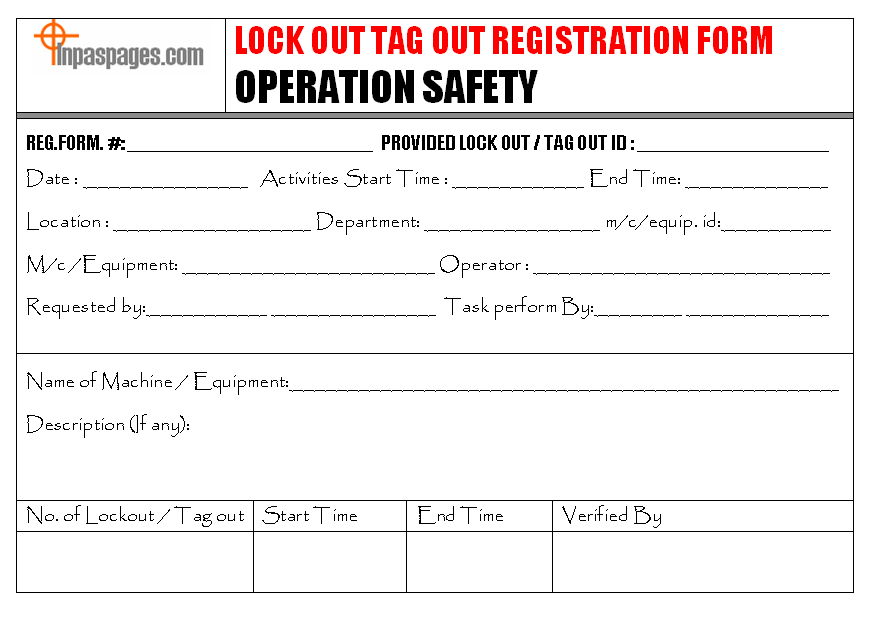
A strong log form isn’t just a blank sheet with lines. It’s a structured document designed to prevent omissions and enforce consistency. Here are the essential fields every form should include:
- Date and Time of Lockout (start and expected end)
- Equipment ID or Name (specific identifier, not just “Machine 1”)
- Department or Location
- Authorized Employee Name and Signature
- Type of Energy Isolated (electrical, hydraulic, pneumatic, thermal, etc.)
- Lock and Tag Numbers Used (for traceability)
- Supervisor or Approving Authority Signature
- Time and Signature for Unlocking (restoration)
- Reason for Lockout (maintenance, repair, cleaning)
Optional but valuable additions: - Space for multiple workers on group lockout - Verification checklist of energy isolation steps - Emergency unlock justification field

Example: A packaging line requires motor replacement. The technician fills out the LOTO log, specifying “Conveyor Line B – Main Drive Motor,” isolates electrical and mechanical energy, logs two padlocks (one personal, one group), and records the shift supervisor’s approval. This form remains posted until the job is complete and every lock is removed.
Common Mistakes That Undermine LOTO Logs
Even facilities with forms in place often fall into traps that reduce their effectiveness. Watch for these:
1. Blank or Incomplete Entries Leaving fields like “energy type” or “unlock time” empty turns the form into a liability. During inspections, OSHA treats missing data as non-compliance.
2. Retroactive Filling Filling out the log after the fact defeats its purpose. The form must be completed at the time of lockout. Memory fails. Timing matters.
3. One Form for Multiple Machines Using a generic “daily maintenance log” that bundles several LOTO events dilutes accountability. Each energy isolation event deserves its own record.
4. Poor Accessibility Storing log forms in a locked office or on a shared drive defeats visibility. The active log should be near the equipment or in a designated safety board.
5. Ignoring Group Lockout Requirements When multiple workers service a machine, each must apply their lock. The log should list all participants, not just the lead technician.
Digital vs. Paper Lockout Tagout Logs: What Works Best?
The debate isn’t whether to log—it’s how. Paper forms are familiar, low-cost, and don’t rely on technology. But digital solutions are gaining ground for good reason.
| Factor | Paper Logs | Digital Logs |
|---|---|---|
| Real-time access | Limited | Yes (cloud-based) |
| Audit readiness | Requires physical retrieval | Instant export |
| Error reduction | Manual entry = higher risk | Validation rules, dropdowns |
| Integration | None | Can sync with CMMS, EAM systems |
| Training & visibility | Local posting only | Remote access for supervisors |
When paper works: Small facilities with low equipment turnover, limited tech infrastructure, or tight budgets. A well-managed binder at the maintenance desk can be effective—if rigorously maintained.
When digital wins: Mid-to-large operations, multi-site companies, or those with complex maintenance schedules. Digital logs reduce human error, enable automatic alerts, and provide real-time oversight.
Example: A chemical plant uses a tablet-based LOTO system. When a technician initiates lockout, the app verifies the correct energy sources, logs GPS-tagged timestamps, and notifies supervisors. The completed log syncs to the safety database instantly.
How to Implement a Reliable LOTO Logging System
Creating an effective system isn’t just about the form—it’s about workflow. Follow these steps:
1. Standardize the Form Adopt a single, company-wide template. Customize for departments if needed, but maintain core fields.
2. Train on Purpose, Not Process Don’t just teach workers how to fill the log—explain why. Connect it to real incidents. Show how a properly filled form protects them.
3. Integrate with Procedures Embed log completion into the LOTO procedure itself. Step 1: Notify. Step 2: Shut down. Step 3: Complete log. Make it a required checkpoint.
4. Audit Monthly Randomly review 10–20% of logs monthly. Check for completeness, accuracy, and timeliness. Feedback must be immediate.
5. Display Accountability Post recent logs near equipment or on safety boards. Visibility reinforces responsibility.
6. Review After Incidents Even near-misses. Was the log completed? Did it reflect reality? Use it as a forensic tool.
Top 5 Lockout Tagout Log Solutions in Use Today Whether you’re paper-based or going digital, these tools help streamline compliance:
- Seton LOTO Log Books
- Pre-printed, OSHA-compliant logbooks with carbon copies. Ideal for small teams. No tech needed. Best for: Facilities wanting plug-and-play simplicity.
- BradyLockout Pro Software
- Cloud-based LOTO management with digital log forms, reporting, and mobile access. Best for: Multi-site operations needing audit trails.
- Lockout-Tagout Station by Grainger
- Wall-mounted dry-erase board with log sheet pockets. Combines visual management with documentation. Best for: Shops wanting physical visibility and easy updates.
- FaciSafe LOTO App
- Mobile app with checklist-driven log forms, photo capture, and supervisor approvals. Best for: Field technicians and mobile crews.
- Custom Templates (via Google Workspace or Excel)
- Free, flexible, and easy to modify. Add dropdowns, required fields, and sharing controls. Best for: Organizations with internal IT support and standardization goals.
Each option has trade-offs, but the goal remains: ensure every lockout is documented, traceable, and verifiable.
Real-World Use Case: Avoiding a Catastrophe
A food processing plant scheduled quarterly cleaning on a large mixer. Three technicians applied locks and began cleaning the auger. Midway, the shift supervisor received a rush order and pressured them to finish early. One technician removed his lock prematurely. Another stayed inside the machine.
The log form—left incomplete and unsigned—offered no clarity on status. A junior operator, unaware of ongoing work, restarted the system. The auger engaged. Fortunately, emergency stops prevented injury, but the near-miss triggered an investigation.
Root cause? The LOTO log wasn’t completed, wasn’t visible, and wasn’t enforced. Afterward, the plant mandated digital logging, installed lockout stations with posted logs, and tied log completion to job sign-off. No more “we forgot to write it down.”
Build a Culture, Not Just a Log
The lockout tagout log form is more than a compliance document. It’s a cultural artifact—a reflection of how seriously a company takes safety. When every line is filled, every signature collected, and every unlock verified, you’re not just avoiding OSHA fines. You’re protecting people.
Start with a solid form. Train relentlessly. Audit consistently. And never let paperwork become an afterthought.
Because in the moment it matters most—when a machine powers up—the only thing standing between a worker and danger is a decision. And behind that decision should be a completed log, proving it was made the right way.
Frequently Asked Questions
What is the purpose of a lockout tagout log form? It documents each energy control event, ensuring accountability, compliance with OSHA, and safe work practices during maintenance.
Who should fill out the LOTO log form? The authorized employee performing the lockout must complete and sign the form. Supervisors may also need to approve it.
How long should LOTO logs be kept? OSHA recommends retaining records for at least one year, though some companies keep them for three to five years for audit and incident review.
Can digital LOTO logs replace paper forms? Yes, if they meet OSHA’s documentation requirements—permanent, accurate, and accessible records of each lockout event.
Do all employees need to be listed on the log during group lockout? Yes. Each authorized worker applying a lock must be named on the log to ensure all are accounted for before re-energization.
Is a log required for every LOTO event? Absolutely. OSHA requires documentation for every instance where machines are locked out for servicing or maintenance.
Can a LOTO log form be shared across multiple machines? No. Each machine and energy isolation event requires its own log entry to maintain accuracy and traceability.
FAQ
What should you look for in Lockout Tagout Log Form Essentials for Workplace Safety? Focus on relevance, practical value, and how well the solution matches real user intent.
Is Lockout Tagout Log Form Essentials for Workplace Safety suitable for beginners? That depends on the workflow, but a clear step-by-step approach usually makes it easier to start.
How do you compare options around Lockout Tagout Log Form Essentials for Workplace Safety? Compare features, trust signals, limitations, pricing, and ease of implementation.
What mistakes should you avoid? Avoid generic choices, weak validation, and decisions based only on marketing claims.
What is the next best step? Shortlist the most relevant options, validate them quickly, and refine from real-world results.